
Dealership CRM

The whole deal, on one customer record.

Leads, calls, texts, email, follow-up, and desking stay together from first inquiry through the sale, so your team always knows what comes next.

How a customer moves through Feather Light.

A ready-made sales process is in place from the start, so you can begin working leads within 10 minutes of setup.

01 / Capture and assign

Every inquiry gets an owner.

Leads arrive with customer, vehicle, and source details, then go to the right salesperson.

02 / Work and follow up

The next step stays visible.

Conversations, tasks, and reminders sit with each customer, so follow-up does not depend on memory.

03 / Desk and close

Numbers stay with the customer.

Work through payment scenarios without leaving the record, then send the deal to lenders.
Designed for the work between first contact and sold.

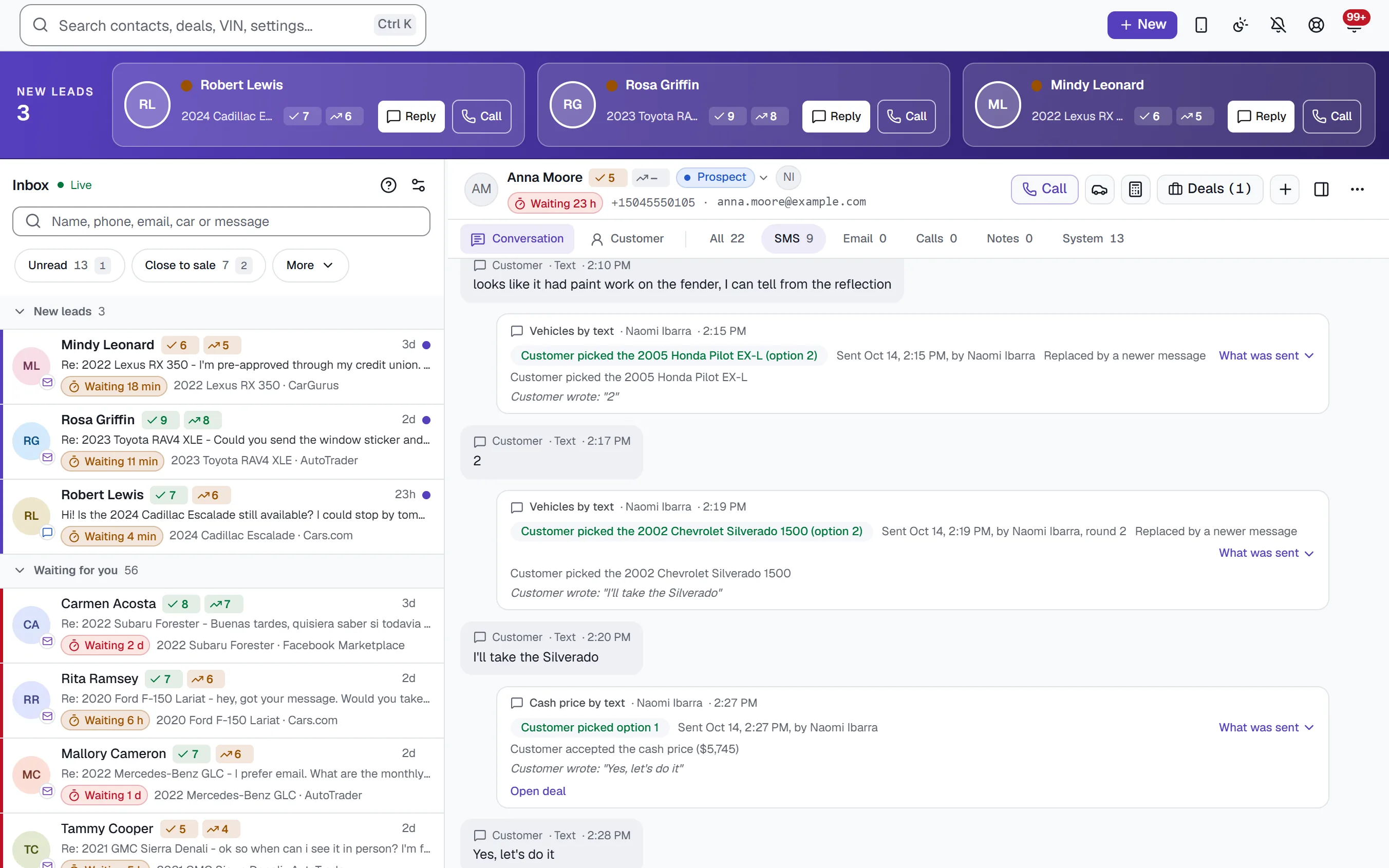
The inbox: three new leads across the top, then each customer waiting for a reply with their vehicle, lead source and how long they have waited, and the open conversation on the right. Opens a larger view.
Leads

See the next lead clearly.

Keep inquiry details, vehicle interest, and assignments together so nothing waits on someone to ask who has it.
  • Customer, vehicle, and source captured with each lead
  • Assign leads to the right salesperson
  • Intake from website forms, phone calls, and any lead provider that sends ADF email, such as CarGurus, Autotrader, and Cars.com
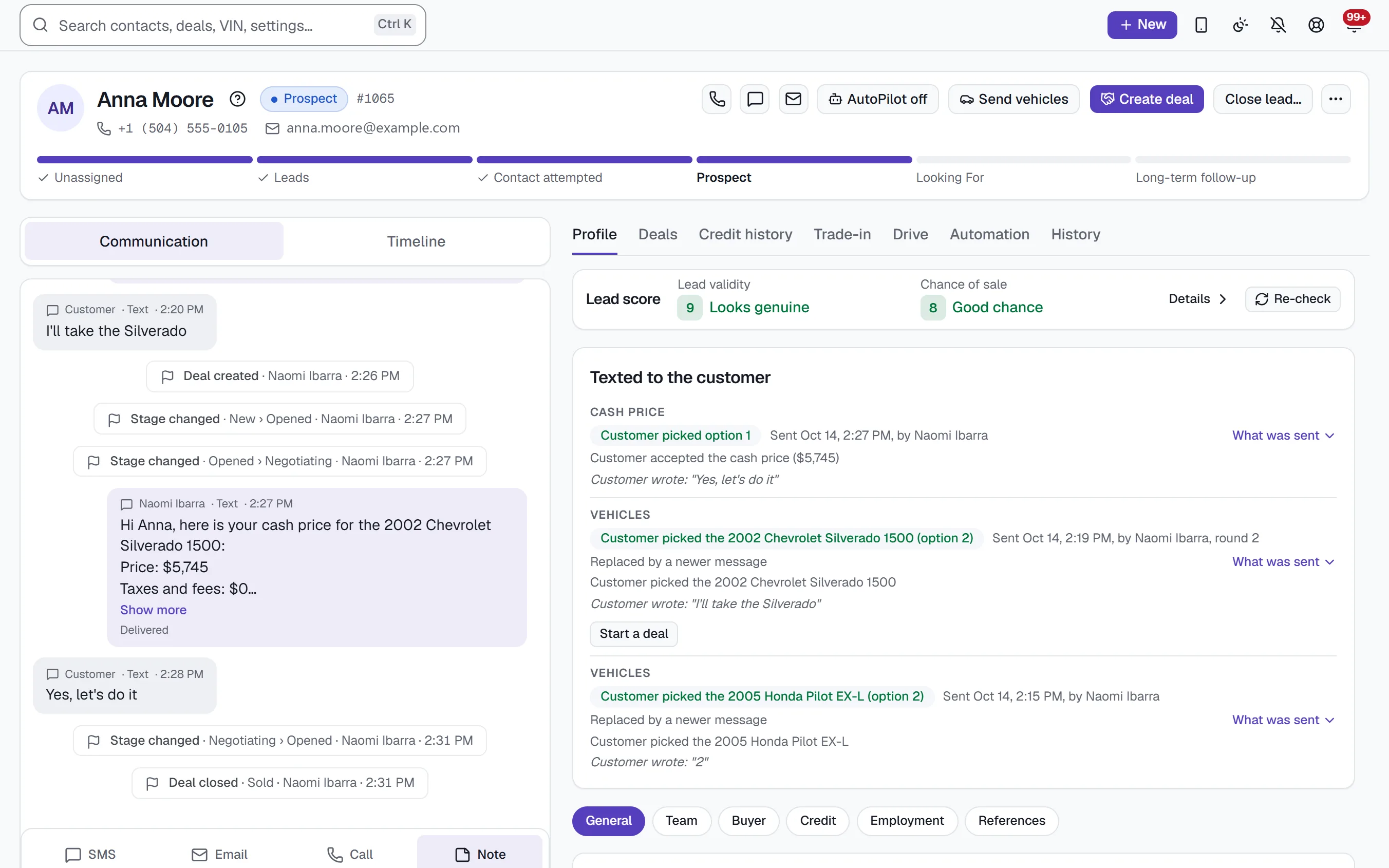
A customer record: contact details and sales stage at the top, the conversation and deal steps on the left, and lead details and messages sent on the right. Opens a larger view.
Customer record

One timeline per customer.

The record is the home base. Whoever opens it sees what happened and what happens next.
  • Calls, texts, emails, and notes in a single history
  • Vehicle interest and deal activity alongside
  • Anyone can pick up where the last person left off
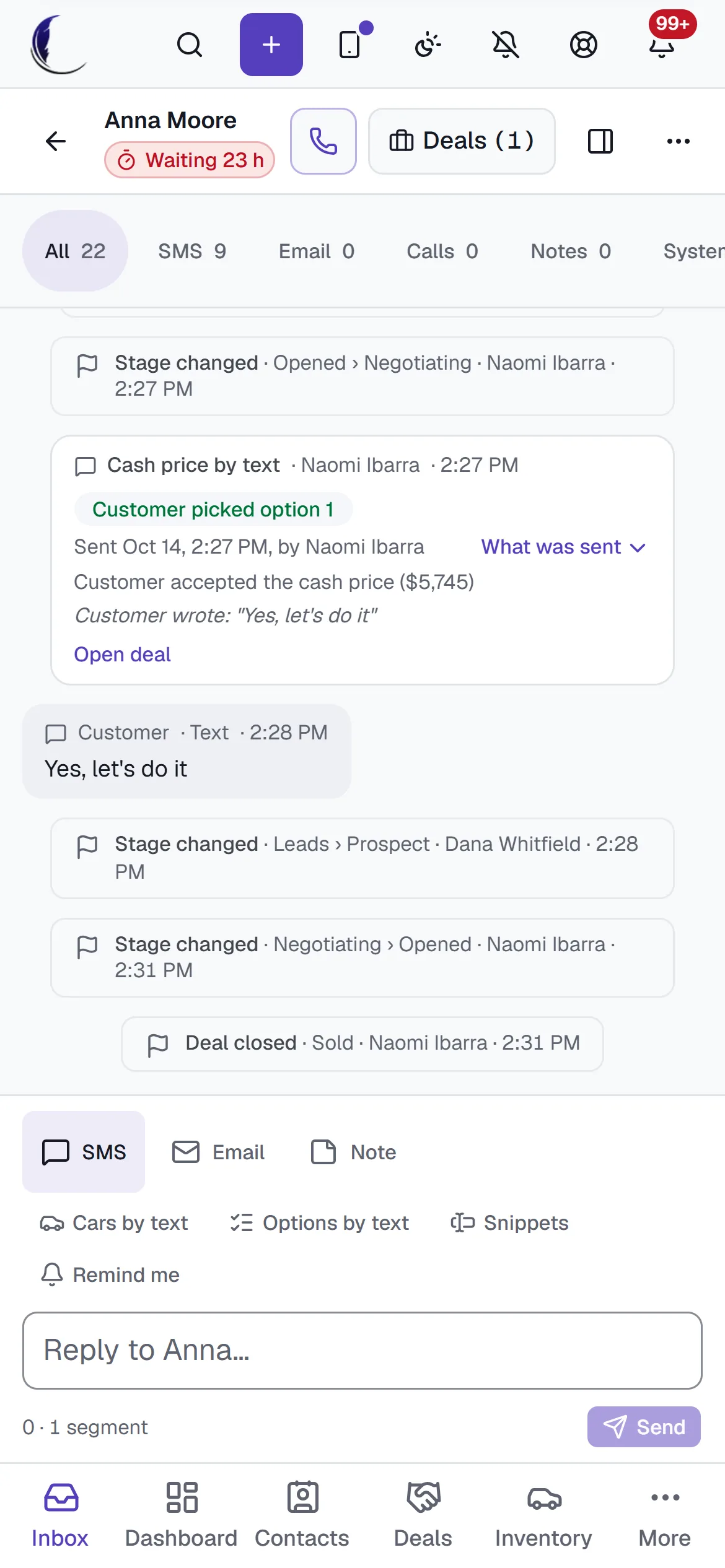
A customer conversation on a phone: texts, the cash price the customer accepted, and each deal step, with SMS, email and note buttons below. Opens a larger view.
Communications

Keep the conversation with the customer.

Customers reach out by phone, text, and email. The team should not have to hunt for any of it.
  • Two-way text with photo attachments (SMS and MMS)
  • Click to call: the salesperson’s phone rings first, and the customer is dialed once they pick up
  • Incoming calls ring the dealership’s phone or go straight to the customer’s assigned salesperson, whichever you choose
  • Call recording, with every call logged to the customer
  • Email history kept with the same customer
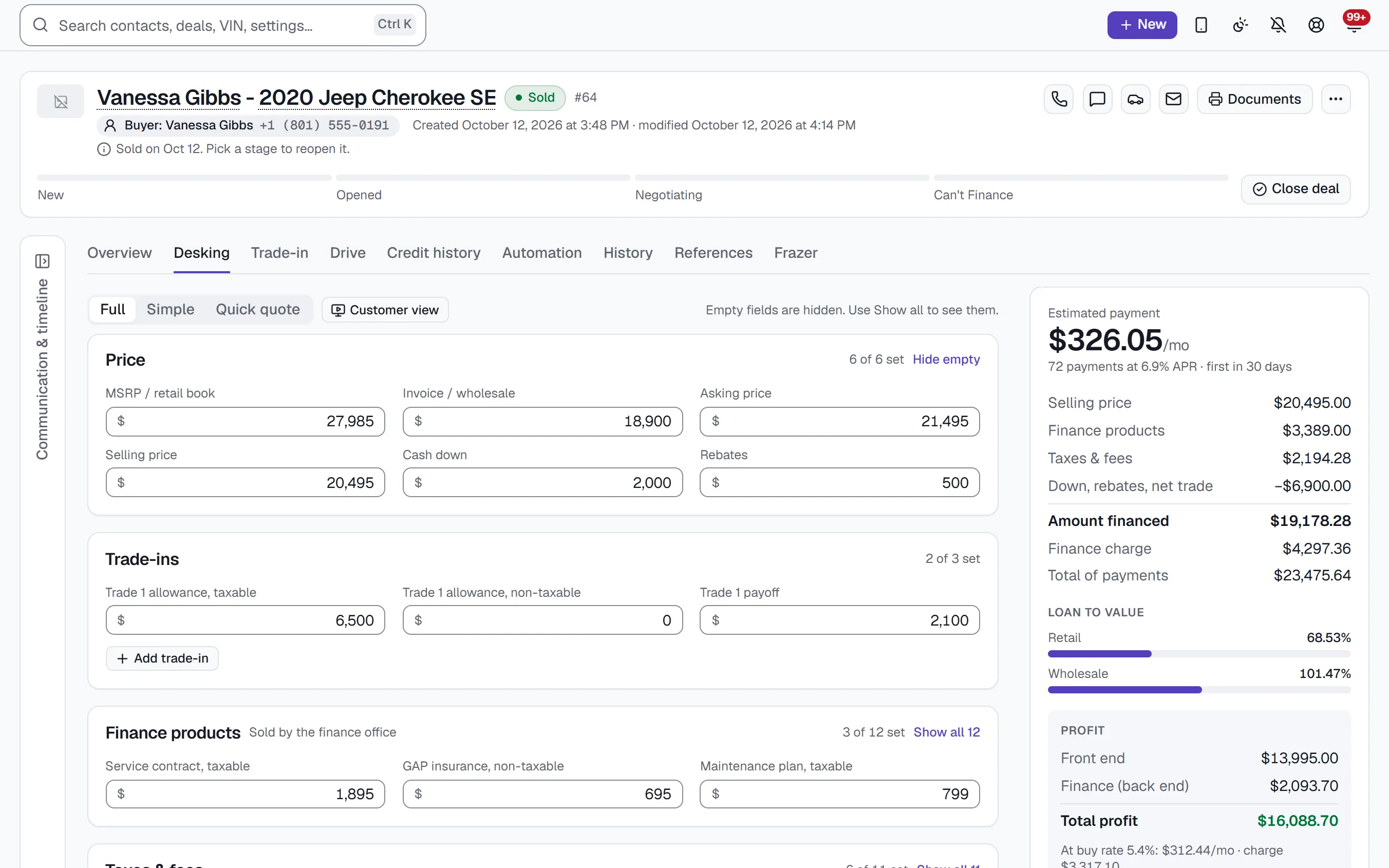
The desking worksheet for a 2020 Jeep Cherokee: price, trade-in and finance product fields, with the estimated payment of $326.05 a month, loan to value and deal profit on the right. Opens a larger view.
Desking

Make the deal easier to discuss.

Each payment scenario starts with the customer and vehicle already filled in.

  • Every payment option in one table: terms, down payments, and add-ons
  • Credit options and service contracts calculated for each deal
  • Print the options as a one-page menu for the customer
  • Vehicle and trade details in view
  • No re-keying the customer into a second tool
Try the desking calculator
Credit and lenders

Pull credit and reach lenders from the deal.

Request a customer’s credit report through direct integrations with credit agencies, then send the deal to lenders using the data already in the system.

  • Direct credit agency integrations
  • Deal data sent to lenders without retyping
Vehicle inventory

See which cars draw interest.

Track your vehicles with their sales and offer history, so you see which vehicles customers are interested in.
  • Sales and offer history for each vehicle
  • Customer interest by vehicle
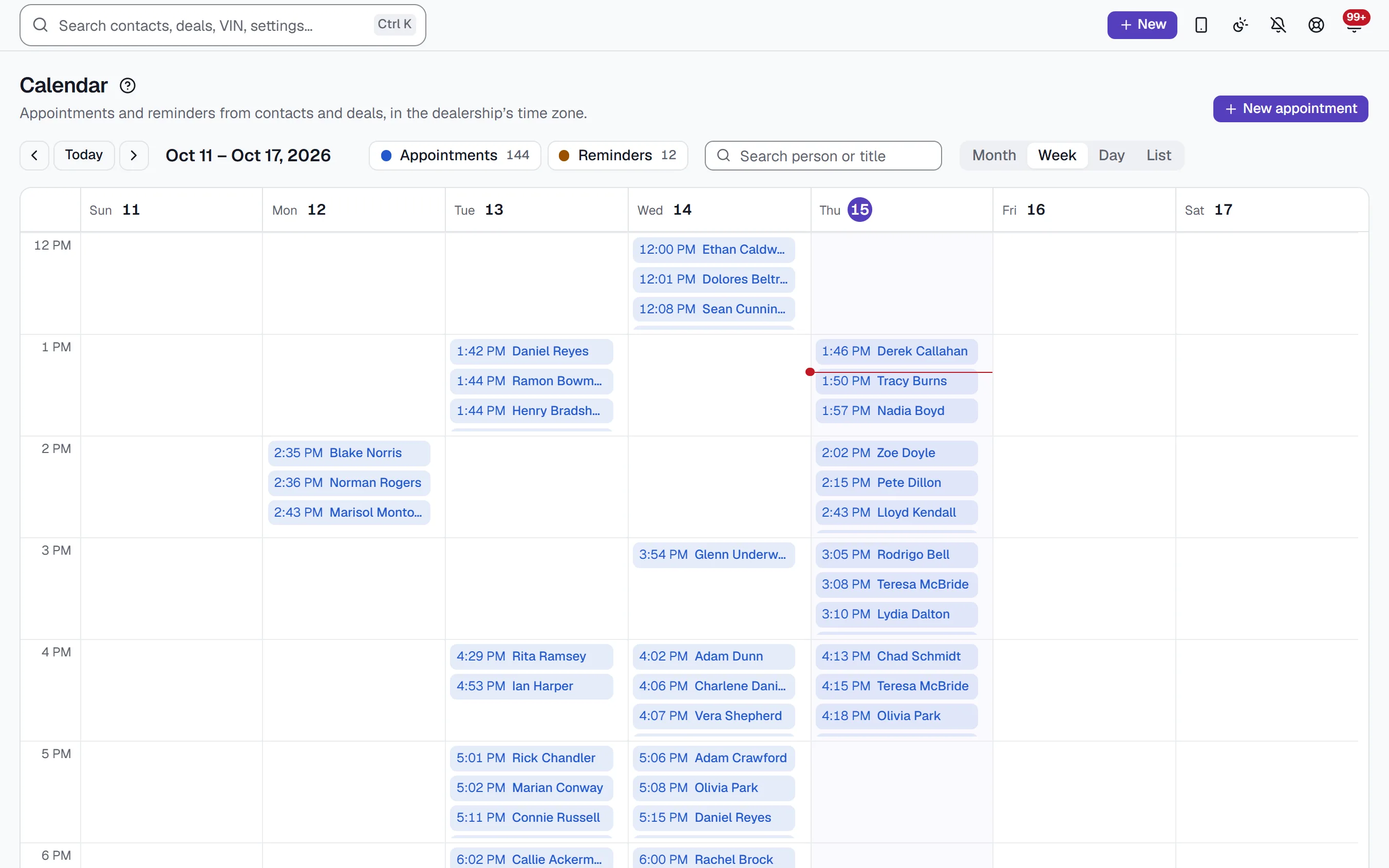
The calendar in week view, with each day’s appointments listed by time and customer. Opens a larger view.
Follow-up

Keep the next action visible.

Tasks and reminders bring the team back to every conversation that still needs a decision or a reply.
  • Tasks and reminders tied to each customer
  • A working list of what is due and overdue
  • Timed follow-up sequences for buyers who go quiet
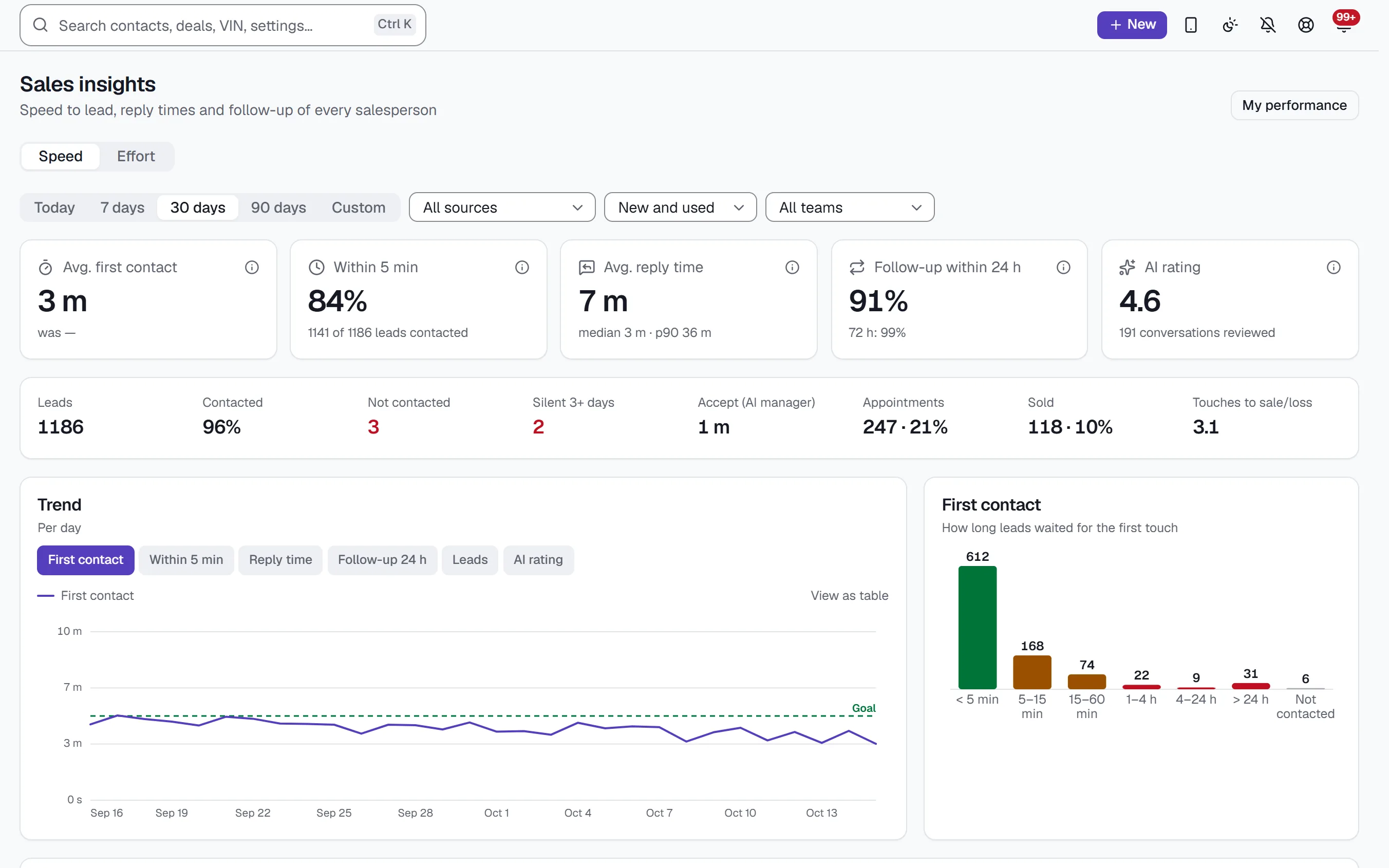
Sales insights: average first contact time, leads contacted within 5 minutes, reply time and follow-up within 24 hours, with a trend chart and how long leads waited for a first touch. Opens a larger view.
Manager view

Coach from what actually happened.

Check what the team did with each lead without asking for an update.

  • See who has picked up each inquiry
  • Spot overdue tasks and stalled conversations
  • Track team activity and lead conversion

Autopilot keeps new leads warm.

Autopilot is an AI assistant that engages new inquiries before a salesperson takes over. It and every customer-communication automation are off by default; an authorized dealership administrator must create or enable and configure each one.

  • Engages new inquiries so they are not left sitting
  • Hands the conversation forward to your salesperson
  • Your dealership stays in charge of its customer relationships and sales process

When a salesperson picks up a lead, they see

  • The customer and the vehicle they asked about
  • Where the lead came from
  • Every call, text, and email so far
  • The next task and when it’s due

What teams ask about first.

Does Feather Light replace our DMS?

No. Feather Light is the CRM and desking tool your sales team works in, alongside your DMS. If you use Frazer, the two connect: inventory syncs both ways, and sold deals go to Frazer.

Can salespeople use it on the lot?

Yes. There’s no app to install: Feather Light runs in the browser on a phone or tablet as well as at a desk, and you can add it to your home screen to open it like an app. To call a customer, tap their number: your phone rings first, and Feather Light dials the customer once you answer.

Is customer data protected?

Feather Light provides safeguards and processor terms that can support a dealership’s information-security program. Your dealership remains responsible for its own FTC Safeguards Rule assessment, program, notices, access decisions, and service-provider oversight. Our security page explains the controls and documents available for review. Nothing here is legal advice.

What happens to leads that come in after hours?

They still land in the CRM with the customer and vehicle attached. Customer communication automations are off by default. If an authorized dealership administrator enables and configures Autopilot, new inquiries can receive replies until a salesperson takes over.

We’ll walk through the product using dealership scenarios.

Bring an example from your lead flow, a desking question, or how you use Frazer. We’ll run it in Feather Light, live.

Book a walkthrough
Book a walkthroughCall